

A bedroom sleeper, remote worker, or apartment resident may want a fan that moves air across the room without taking over the floor or adding distracting noise. Choose the wrong design, however, and you may get limited airflow direction, controls that are inconvenient at night, or a grille that is difficult to clean.
This guide compares the Best Quiet Oscillating Tower Fans by stated noise claims, airflow settings, oscillation range, controls, timers, placement, and maintenance features. It also separates slim tower designs from a more traditional adjustable-height circulator so you can prioritize the feature that matters most in your room.

Pros
- 90-degree oscillation
- Four operating modes
- Five speed settings
- Remote, app, and voice control
- 28dB sleep setting
Cons
- 40-inch tower requires dedicated floor space
- Smart features may not suit simple-control preferences
- Who should skip it: shoppers wanting a compact or non-smart fan

Pros
- Five speed settings
- Remote stores on the fan
- Auto-off timer
- Automatic control-panel light shutoff
Cons
- Nearly 40 inches tall
- Who should skip it: shoppers with limited vertical clearance

Pros
- Eight speeds and four operating modes
- 90-degree oscillation
- WiFi and voice control
- Eight-hour timer
- Accessible cleaning components
Cons
- 36-inch tower may not suit every space
- Smart features may be unnecessary for simple fan use
- Who should skip it: Shoppers wanting a basic, non-connected fan

Pros
- Eight airflow speeds
- Remote and touchscreen controls
- 80-degree oscillation
- One-to-eight-hour timer
- Compact 3.3-pound design
Cons
- Tabletop format may not suit floor-fan shoppers
- Who should skip it: Shoppers wanting a tall floor-standing fan

Pros
- 12 speed settings
- 120° maximum oscillation
- App and voice control
- 12-hour timer
- Four operating modes
Cons
- Large 42-inch tower footprint
- Who should skip it: shoppers needing a compact fan

Pros
- Four speeds and three modes
- 15-hour timer
- Remote control listed
- Compact floor footprint
Cons
- No room-size guidance provided
- Noise information is not provided
- Who should skip it: shoppers needing documented room coverage or noise details
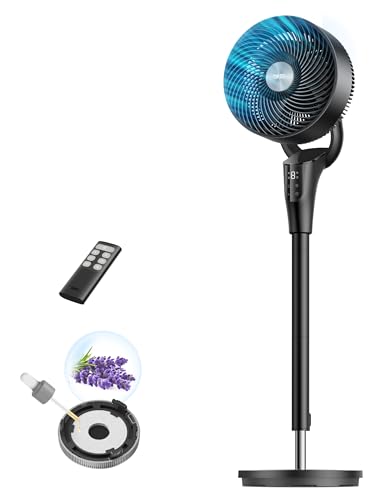
Pros
- 90-degree horizontal oscillation
- 105-degree manual vertical adjustment
- Eight speeds plus Auto Mode
- Detachable parts for cleaning
- Eight-hour timer
Cons
- 38 to 42-inch height range may not suit every setup
- Who should skip it: Shoppers needing a different height range

Pros
- Three airflow speeds
- Widespread oscillation
- Remote controls and timer
- No-tools assembly
Cons
- No room-size guidance provided
- Who should skip it: shoppers seeking documented noise levels

Pros
- Three speeds and two operating modes
- 85-degree oscillation
- 12-hour timer
- Remote control included
- Slim floor-standing design
Cons
- No independent noise or airflow measurements provided
- Who should skip it: Buyers needing verified room-size performance guidance

Pros
- Remote control included
- Seven-hour programmable timer
- 60-degree oscillation
- Three fan speeds
- Slim 36-inch design
Cons
- Only three speed settings
- Not intended for larger rooms
- Skip it if you need stronger cooling or advanced controls
How to Choose the Best Quiet Oscillating Tower Fans
Noise claims and nighttime controls
Noise matters most when the fan runs beside a bed, in a nursery-adjacent room, or behind a work desk. The listing specifies 25 dB for the DR.PREPARE Tower Fan for Bedroom, 28 dB for the DREO Smart Tower Fan for Bedroom and the OSTBA 43” Tower Fan for Bedroom, and 28 dB for the first DREO Smart Tower Fan for Bedroom. These are manufacturer-stated figures, so treat them as useful comparison points rather than a guarantee of the sound you will hear in your room.
Sleep mode, display shutoff, and a timer can be as important as a low-noise claim. Honeywell offers dimmable sleep mode, automatic control-panel light shutoff, and an auto-off timer. OSTBA turns off its lights in sleep mode and includes a 12-hour timer, while the 28 ft/s DREO version has an 8-hour timer. If a dark bedroom is a priority, verify which display behavior applies in the exact mode you plan to use.
Airflow strength, speed range, and room placement
More speed settings give you finer control, but they do not automatically mean stronger or quieter airflow. The DREO 28 ft/s model provides eight speeds, the 120-degree DREO model provides 12, and the DR.PREPARE model provides eight. Honeywell uses five QuietSet levels, while the Amazon Basics, Lasko, and OSTBA models emphasize simpler controls with three speeds.
For a large or unusually warm work area, the Lasko High Velocity Oscillating Tower Fan listing specifies up to 509 CFM and describes use in home offices and garages. Its three speeds favor straightforward high-output airflow over fine adjustment. For a bedroom or compact office, a model with more settings may make it easier to settle on a gentler breeze.
Oscillation range and airflow direction
Oscillation determines how broadly the fan sweeps air, while vertical adjustment determines where the breeze lands. The 120-degree DREO model offers selectable 30, 60, 90, or 120-degree angles, making it the most adjustable option in this group for changing coverage. The first two DREO tower fans provide 90 degrees, DR.PREPARE provides 80 degrees, OSTBA provides 85 degrees, Amazon Basics provides 70 degrees, and the Lasko 36-inch model provides 60 degrees.
The DREO Fan for Bedroom, Standing Oscillating Fan is a different design choice. It combines 90-degree horizontal oscillation with a 105-degree pivoting head and adjustable height from 38 to 42 inches. That flexibility may suit a living room or bed-height placement, but shoppers wanting a narrow, enclosed tower should choose one of the dedicated tower designs instead.
Controls, remote access, and smart-home features
A remote is practical when the fan sits across a bedroom or office. Honeywell, both Lasko models, Amazon Basics, OSTBA, and DR.PREPARE list remote controls. The DREO models add app-based control, and the two smart tower descriptions specify Alexa and Google Home compatibility. These features are useful if you want to adjust speed without walking across the room, but a basic remote may be preferable if you do not need app access.
The 120-degree DREO model lists four modes and 12 speeds, while the first DREO model lists Normal, Natural, Sleep, and Auto modes. Auto mode is described as adjusting fan speed based on ambient temperature. Since smart features can add setup steps, verify your preferred control method and network requirements before buying.
Cleaning access and ongoing care
Fans collect dust, so cleaning access affects how practical a model is over time. The 28 ft/s DREO listing specifically describes a removable rear grille and impeller wheel. DR.PREPARE lists a detachable impeller wheel and rear guard, and the adjustable DREO circulator describes separate removable blade, front grille, and rear grille components. These details may make dust removal more accessible than a design with no stated removable parts.
The supplied information does not establish that any of these fans or parts are dishwasher-safe. Follow the manufacturer’s care instructions, unplug the fan before cleaning, and verify access to the areas that collect dust. For broader household appliance research, see our cooling appliance category.
Balanced product considerations
DREO Smart Tower Fan for Bedroom: Pros include a stated 28 dB low-noise level, 90-degree oscillation, four modes, app and voice control, and a 12-hour timer. Cons are that the supplied data does not provide dimensions or cleaning access. Who should skip it: shoppers who want a clearly documented removable grille or do not need smart controls.
Honeywell 40″ Quiet Set Oscillating Tower Fan: Pros include five QuietSet levels, a dimmable sleep mode, automatic panel-light shutoff, a remote, and remote storage. Cons include fewer speed levels than several DREO options and no supplied numerical noise rating. Who should skip it: buyers who specifically want a published dB figure or app control.
DREO Smart Tower Fan for Bedroom, 28ft/s Velocity: Pros include eight speeds, 90-degree oscillation, app and voice control, an 8-hour timer, and stated removable cleaning components. Cons include a shorter listed timer than some alternatives and no supplied dimensions. Who should skip it: shoppers who need a 12-hour timer or the widest stated oscillation.
DR.PREPARE Tower Fan for Bedroom: Pros include a stated 25 dB noise level, eight speeds, remote control, 80-degree oscillation, an 1 to 8-hour timer, and detachable cleaning parts. Cons include its 16-inch desk or table format and narrower oscillation than several floor towers. Who should skip it: buyers who need a full-height floor fan for broad room coverage.
DREO Smart Tower Fan for Bedroom, 120° Oscillating: Pros include 12 speeds, selectable oscillation angles up to 120 degrees, four modes, app control, and voice-assistant compatibility. Cons include no stated numerical noise level and no supplied cleaning-access details. Who should skip it: shoppers who want a documented dB claim or simpler controls.
DREO Fan for Bedroom, Standing Oscillating Fan: Pros include adjustable 38 to 42-inch height, a 105-degree pivoting head, 90-degree oscillation, eight speeds, and stated removable grilles and blade. Cons include a pedestal-style format rather than a slim tower and no supplied numerical noise rating. Who should skip it: buyers with very limited floor space or a preference for enclosed tower styling.
Amazon Basics 40″ 70-Degree Oscillating: Pros include a compact listed footprint, 70-degree oscillation, digital controls, three modes, and a 15-hour timer. Cons include only four listed speeds in the title and no supplied noise rating or cleaning-access details. Who should skip it: sleepers who need a documented quietness claim.
Lasko High Velocity Oscillating Tower Fan, 35″: Pros include stated airflow up to 509 CFM, widespread oscillation, remote control, and a 7-hour timer. Cons include three speeds and no supplied numerical noise rating. Who should skip it: buyers whose first priority is the lowest possible bedroom noise rather than strong airflow.
OSTBA 43” Tower Fan for Bedroom, 85° Oscillating: Pros include a stated 28 dB rating, 85-degree oscillation, sleep mode, a 12-hour timer, remote control, and a carry handle. Cons include only three speeds and two modes. Who should skip it: shoppers who want granular speed adjustment or app control.
Lasko Oscillating Tower Fan with Remote Control: Pros include three described quiet speeds, 60-degree oscillation, remote control, a 7-hour timer, and a slim floor design. Cons include narrower oscillation than most listed options and no supplied numerical dB rating. Who should skip it: buyers who need broad sweep coverage or many speed settings.
How We Compared These Products
We compared the supplied product specifications and feature descriptions, including stated noise levels, airflow claims, speed and mode counts, oscillation ranges, timers, controls, placement formats, and cleaning access. This is product research based on published information and available listing feedback, not a firsthand performance assessment. For more about the site’s approach, visit our editorial research method.
Which Option Fits Your Kitchen?
For a bedroom where a stated low-noise figure matters: Consider the <a href="DR.PREPARE Tower Fan for Bedroom for its listed 25 dB claim, or the <a href="OSTBA 43'' Tower Fan for Bedroom, 85° Oscillating for its stated 28 dB operation, sleep mode, and 12-hour timer. The DR.PREPARE is a compact desk or table fan, while the OSTBA is a floor-standing tower, so placement is the key distinction.
For adjustable coverage across a living room or open kitchen area: The <a href="DREO Smart Tower Fan for Bedroom offers selectable oscillation angles from 30 to 120 degrees and 12 speeds. If you want vertical positioning as well as horizontal movement, the <a href="DREO Fan for Bedroom, Standing Oscillating Fan adds adjustable height and a pivoting head, though its pedestal format may need more visual and floor space.
For strong airflow in a work area: The <a href="Lasko High Velocity Oscillating Tower Fan – 35" lists airflow up to 509 CFM and widespread oscillation. Choose it when airflow output is more important than a published low-noise number, and confirm that its 35-inch tower format suits the intended location.
Frequently Asked Questions
Are these fans truly silent?
No fan should be assumed to be silent. Several listings provide manufacturer-stated figures, including 25 dB for DR.PREPARE and 28 dB for two DREO or OSTBA models, but actual perceived sound can vary with speed, placement, room acoustics, and the surface supporting the fan.
Which models are suitable for a bedroom?
Models with sleep modes, display shutoff, timers, or stated low-noise figures are the most directly aligned with bedroom use. DR.PREPARE, OSTBA, Honeywell, and the DREO models list combinations of those features, so compare the particular control and timer behavior you prefer.
Do all of these fans oscillate?
The supplied descriptions identify oscillation for all 10 listed products, but the sweep varies from 60 degrees on the Lasko 36-inch model to 120 degrees on the DREO 120-degree model. A wider sweep is useful when several seating or sleeping positions need airflow.
Which fan offers the most speed settings?
The DREO Smart Tower Fan for Bedroom with 120-degree oscillation lists 12 speeds. The 28 ft/s DREO model and DR.PREPARE list eight, while Honeywell lists five QuietSet levels and several simpler models list three.
Are the fan parts dishwasher-safe?
The supplied data does not state that any of the fans or removable parts are dishwasher-safe. Some models describe removable grilles, impellers, blades, or guards, but you should follow the exact care instructions before using water or a dishwasher.
Should I choose a tower fan or a pedestal-style circulator?
A tower fan generally suits shoppers prioritizing a slim vertical footprint, while the DREO adjustable circulator offers height adjustment and a pivoting head for more directional placement. Measure the available floor area and decide whether vertical positioning is more useful than a narrow enclosure.
Can these fans replace air conditioning?
A fan moves air and can make a room feel more comfortable, but the supplied information does not establish that any model lowers room temperature like an air conditioner. Several listings describe using a fan with air conditioning to improve air movement, so consider the fan an airflow appliance rather than a substitute for cooling equipment.






Write Your Review
No reviews yet. Be the first to share your experience!